

Digital Fitness Aplication

Project Context
Industry Project- Mondelez International
Time Frame - Oct 2020 (3 Weeks)
Live in South East Asia
Digital Fitness App
My Role:
Research, Concept Development, & story Boarding Wire-framing & Visual Design.
Tools:
Adobe XD, Axure, Miro, Photoshop, Illustrator
Using Microsoft PowerApps Platform to create an application with an aim of challenging & promoting digital & technological knowledge amongst the Mondelez employees.
Process
Derived from the research findings and stakeholder meetings, I came up with the following design process to make the process of designing easier.


Define
Design
Prototype
Go Live
Identifying Design Principles
Derived from the research findings and stakeholder meetings, I came up with the following design principles to keep it grounded within the scope:

Our Users
We know our users are busy. We know they want to learn new things. They’re leaders, young professionals, and senior members. They don’t have a lot of time to learn the ins and outs of new technology being used with Mondelez so it’s our job to make it clear.


Storyboarding
The outcome of ideation
After several discussion with the stakeholders and brainstorming session we came up with a basic structure and feature set for the Digital Fitness App.


Information Architecture

After my initial research and ideation, I drafted out the site map, which served as a visual representation of the app’s navigation and hierarchy.
This process helped me distill the specific steps required for the application.

Low- Fidelity Wireframes
Wire-framing some of the main screens to build a smooth user flow and the information needed to display on each page.


Design Style 1
Throughout the design process, I ran usability testing to verify design decisions. This process helped confirm that our task flow meets the stakeholder's expectations and as to what patterns users did or did not understand.
Additionally, after launch we prompted users to give feedback about their experience. This has helped us to keep track of pain points and what we did well.
User Feedback
-
Our participants responded in an overall positive manner.
-
Mentioned that this system could be beneficial to their organization in this current time of pandemic where they want to technically upskill the organization members.
-
Stakeholders found a lot of the features to be useful, but they were not entirely sold on Challenge friends - Thought it could cause negative competition.
-
Some were confused by the color scheme and weren’t a fan of mondelez purple scheme. Wanted me to try a 'tech' look while maintaining brand guidelines.
-
Majority of our participants liked our prototype and thought it was easy to use.

Revised High- Fidelity Wireframes



Final Design
After a few iterations, I created the final prototype for handoff to the engineers. iterations, I created the final prototype for handoff to the engineers.
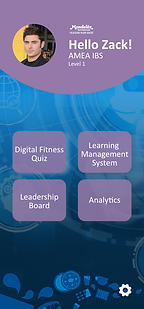
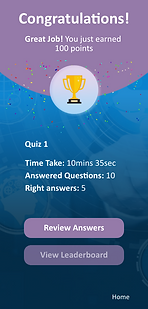
The main screen designs were for the omboarding process, login in, Home page, Quiz, Leaderboard and Notifications.

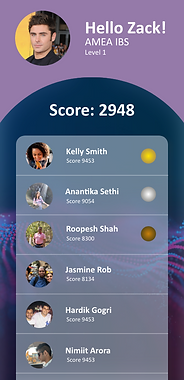
Leadership board
Digital Fitness gamifies the usage of the learning process through a leaderboard that shows how are the other colleagues performing in the activities.
Education
The first step toward change is awareness. The platforms offers news articles on the home page for users to learn more about the new technologies and how it can help.
Data are individual facts or items of information, often numeric, that is collected through observation
View more
Visual Style
Features Of Digital Fitness Application
Challenge Friends (Gamification) -
To making the learning curve easier and interesting the content to be shared was put forward in a gamified manner.
Learning Management System-
The Digital Fitness App Quiz are linked to Mondelez Learning University to aid the quiz takers to learn and gain more insights to their interested topics.
Back End Analytics-
The Mobile app has a backend reporting on QuickBase so that the stakeholder could view feedback shared and reports and charts of the usage and quiz.
Game Lifeline -
To not make the users feel lost at any stage during the quick, there are lifeline options to run for help.
04.
01.
03.
02.

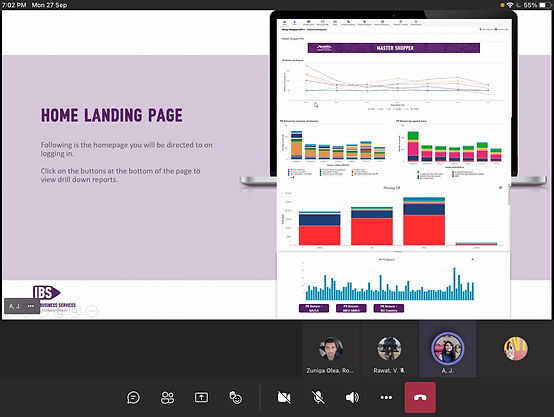
Backend Dashboard

The backend tracking for the application was developed on Quickbase Platform by the development team at Movile CoP Team at Mondelez.
The backend dashboard helped us record feedback, track the app usage by different towers. Record analysis of the quiz and create summary reports.
After being successful in the Southeast Asia region. Digital Fitness App is all set to be taken ahead in the different regions across Mondelez Employees.
